
Microsoft Kills Together Mode in Teams Video Calls

Microsoft discontinues Together mode feature in Teams, citing implementation complexity. Gallery view becomes primary alternative for virtual meeting spaces.
Microsoft has announced the discontinuation of Together mode, a distinctive feature within Microsoft Teams that previously allowed video conference participants to appear alongside one another in a shared virtual environment. The company's decision to retire this functionality marks a significant shift in how the platform will handle visual presentations during team meetings and collaborative sessions.
According to Microsoft's official statement, the decision was driven by concerns regarding excessive implementation complexity associated with maintaining the Together mode feature. The company determined that the technical overhead required to support this functionality did not justify the continued investment, especially when alternative solutions could deliver comparable user experiences with significantly less infrastructure strain. This pragmatic approach reflects Microsoft's broader strategy of streamlining its product offerings to focus on features that deliver maximum value with optimal resource allocation.
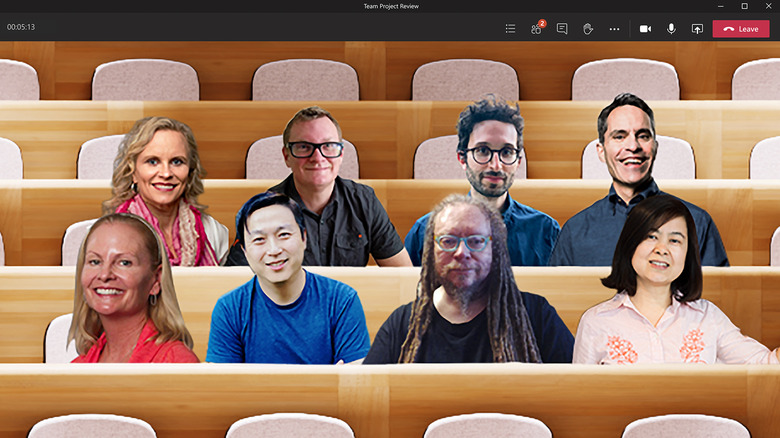
The Together mode Microsoft Teams feature had been introduced as an innovative way to foster a greater sense of presence and connection among remote workers. By virtually placing all participants in the same digital room—whether styled as a conference hall, coffee shop, or other themed environment—the feature aimed to combat the fatigue and disconnect often associated with traditional grid-based video layouts. However, despite its conceptual appeal and initial enthusiasm from early adopters, the feature ultimately failed to achieve widespread adoption rates that would justify its continued maintenance.
In place of Together mode, Microsoft is actively encouraging Teams users to transition toward utilizing the platform's gallery view option, which has become the primary visual interface for Teams video conferencing. Gallery view presents all meeting participants in a grid-based layout, allowing users to see multiple colleagues simultaneously in a straightforward, efficient manner. While this approach may lack the immersive, thematic environments that Together mode provided, gallery view has proven to be more stable, easier to implement, and widely compatible across various devices and connection speeds.
The shift away from Together mode represents a broader industry trend toward prioritizing functionality and stability over experimental features that, while innovative, may not resonate with the majority of enterprise users. Many organizations had invested time and resources in learning to utilize Together mode for specific use cases, including training sessions, large-scale meetings, and creative brainstorming environments. The discontinuation will require these organizations to reassess their virtual meeting strategies and determine whether alternative tools or features can adequately fulfill their previous use cases.
Gallery view, which will now serve as the default recommendation for Teams meeting layouts, offers several advantages that explain Microsoft's strategic decision. The feature requires fewer computational resources, loads more quickly on slower internet connections, and provides a consistent user experience across different operating systems and devices. Additionally, gallery view's simplicity makes it more accessible to users with varying levels of technical proficiency, supporting Microsoft's broader accessibility initiatives within the Teams platform.
This decision by Microsoft underscores the importance of data-driven product management in enterprise software development. While Together mode represented an ambitious attempt to reimagine how remote teams could interact virtually, actual usage metrics evidently demonstrated that the feature's complexity outweighed its perceived benefits for most organizations. Microsoft's willingness to discontinue underperforming features, rather than maintaining them indefinitely, demonstrates a commitment to platform efficiency and user focus.
For Teams users and administrators who had customized their meeting experiences around Together mode, the transition period may require some adjustment. Microsoft has recommended that organizations gradually encourage employees to familiarize themselves with gallery view's full capabilities, which include options for adjusting display sizes, focusing on specific speakers, and managing participant visibility. Many users may discover that gallery view, when properly configured, can fulfill most of their meeting visualization needs without the additional complexity that Together mode introduced.
The discontinuation of Together mode also raises questions about how Microsoft prioritizes feature development within Teams. The platform continues to face intense competition from alternatives such as Zoom, Google Meet, and other video conferencing solutions, each offering their own unique features and capabilities. By streamlining its feature set and focusing on core functionality, Microsoft aims to create a more reliable and performant experience that can compete effectively in an increasingly crowded market.
Microsoft's development team will redirect resources previously allocated to Together mode maintenance toward enhancing other aspects of the Teams platform. This reallocation may accelerate improvements in areas such as meeting recording capabilities, transcription accuracy, integration with third-party applications, and enhanced noise-suppression technologies. The company's strategic pivot reflects a deeper understanding of how organizations actually use video conferencing tools, prioritizing features that directly impact productivity and meeting effectiveness.
Looking forward, Together mode's discontinuation may serve as a case study for how enterprise software companies evaluate feature success. The decision highlights that innovation alone is insufficient—features must also demonstrate clear value propositions and user adoption rates that justify their ongoing maintenance costs. For Microsoft Teams users, the shift to gallery view represents a return to fundamentals, with the platform focusing on delivering a reliable, intuitive meeting experience that serves the needs of millions of professionals worldwide.
Source: Engadget


