
Xbox Mode Coming to Windows 11: Console Gaming on PC

Microsoft's Xbox mode is rolling out to Windows 11 PCs, bringing a console-like gaming interface to desktop computers. Learn what's new.
Microsoft is bringing the beloved Xbox gaming experience directly to Windows 11 personal computers with the introduction of a dedicated Xbox mode. This significant development marks a pivotal moment in the company's strategy to create a seamless gaming ecosystem across its platforms. The new feature transforms the traditional Windows 11 desktop environment into a streamlined, controller-friendly interface that prioritizes gaming accessibility and user experience.
The Xbox mode for Windows 11 represents years of development and refinement from Microsoft's gaming division. By implementing a console-like interface on PC hardware, the company aims to bridge the gap between traditional console gaming and PC gaming communities. This initiative builds upon Microsoft's existing Game Pass service and Xbox App ecosystem, creating a unified platform where players can access their game libraries seamlessly across devices.
The rollout of Xbox mode is beginning gradually across Windows 11 systems, with the company taking a phased approach to ensure stability and optimal performance. Users will notice a dramatic shift in how they interact with their gaming content when the feature becomes available on their machines. The interface emphasizes quick access to games, achievements, and social features while maintaining the full functionality of Windows 11 for non-gaming applications.
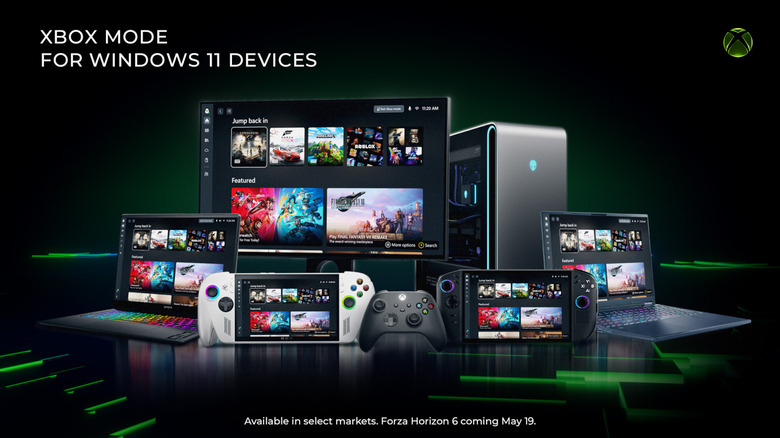
One of the most compelling aspects of Xbox mode Windows 11 is its optimization for gamepad controls. Rather than forcing users to navigate traditional desktop menus with a controller, the new mode presents information in a tile-based layout reminiscent of classic Xbox dashboard designs. This thoughtful approach eliminates friction for console players transitioning to PC gaming while maintaining the powerful hardware capabilities that desktop computers offer.
The interface includes dedicated sections for discovering new games, accessing Game Pass titles, managing achievements and game saves, and connecting with friends across the Xbox network. Microsoft has invested considerable effort into making these elements intuitive and immediately accessible without requiring keyboard and mouse navigation. Players can launch games, check multiplayer invitations, and browse their library entirely through the controller interface.
Microsoft's console-like gaming interface also emphasizes social connectivity, recognizing that modern gaming is increasingly about shared experiences. The mode displays friend activity, allows quick joining of multiplayer sessions, and facilitates communication with other players. This focus on community aligns with trends in contemporary gaming where social features often determine a platform's appeal and longevity.
The integration of Game Pass functionality within Xbox mode provides substantial value to subscribers. Rather than navigating separate applications or websites, users can browse the expansive Game Pass catalog directly from the gaming-focused interface. This streamlined access reduces barriers to discovering and playing new titles, potentially increasing engagement with Microsoft's subscription service and driving additional conversions among Windows 11 users.
Performance optimization represents another critical component of the Xbox mode implementation. Microsoft has ensured that the new interface consumes minimal system resources, preserving maximum GPU and CPU capacity for actual gameplay. This consideration proves particularly important for gaming PCs with varying specifications, as the company must maintain consistent performance across different hardware configurations ranging from budget builds to high-end gaming machines.
The Windows 11 gaming experience is being enhanced through this update in ways that extend beyond mere interface changes. The new mode integrates hardware acceleration, optimizes background processes for gaming, and provides dedicated settings for graphics, performance, and network optimization. These technical improvements complement the visual redesign to create a genuinely optimized gaming environment on Windows 11 systems.
Microsoft's approach to rolling out Xbox mode demonstrates the company's commitment to listening to user feedback and community requests. Gaming enthusiasts have long advocated for better gaming-focused interfaces on Windows, and this feature directly addresses those demands. By creating a dedicated gaming environment rather than forcing users to navigate standard Windows menus with controllers, Microsoft shows understanding of the distinct needs of the gaming demographic.
The implementation of Xbox mode on PCs also reflects broader industry trends toward ecosystem integration. Sony has similarly invested in cross-platform features, and Nintendo continues to strengthen its online services. Microsoft's move positions the company competitively within this landscape by offering tangible benefits to users who own multiple Xbox devices or maintain Game Pass subscriptions across platforms.
Early reports from testers who have accessed Xbox mode in preview builds indicate largely positive reception. Users appreciate the controller-friendly design, appreciate the performance optimization, and value the convenient access to game libraries and Xbox services. Some have noted that the feature particularly benefits players who prefer couch gaming setups where traditional Windows interfaces prove awkward to navigate.
The gradual rollout strategy allows Microsoft to monitor system stability, collect user feedback, and make adjustments before pushing the feature to the entire Windows 11 user base. This measured approach has historically served the company well, preventing negative experiences that could damage the Xbox brand and user satisfaction with Windows 11. The company continues gathering telemetry data from preview participants to ensure the final release meets quality expectations.
Looking forward, Xbox mode for Windows 11 represents just one component of Microsoft's broader gaming vision. The company continues investing in cloud gaming through Xbox Cloud Gaming, developing exclusive titles through Game Studios acquisitions, and expanding Game Pass to reach ever-larger audiences. Xbox mode serves as a critical touchpoint that makes these services more accessible and appealing to Windows 11 users who might not otherwise engage with Xbox offerings.
Users interested in accessing Xbox mode should ensure their Windows 11 systems are fully updated and eligible for the feature rollout. The company is utilizing its standard Windows Update mechanisms to distribute the feature, meaning most modern Windows 11 devices should receive it in the coming weeks or months. Those who cannot wait can join the Windows Insider program to access preview builds featuring the new functionality.
Source: Engadget


