
Mount Your Smartphone to Steam Controller Now

Discover how to attach your mobile device to a Steam Controller. Learn about compatibility limitations with iOS and Android apps.
Valve's Steam Controller has long been a versatile gaming peripheral for PC gamers, but its potential extends beyond traditional desktop gaming. A mounting solution has already emerged that allows users to attach their smartphones directly to the controller, transforming it into a mobile gaming device with physical controls. However, prospective users should be aware that widespread app compatibility remains limited at this stage, which could affect the overall utility of such a setup for many mobile gamers.
The ability to mount a smartphone to a Steam Controller represents an interesting intersection of mobile gaming and dedicated gaming hardware. By physically securing a device to the controller, users can experience console-like gaming on their smartphones without the need for cumbersome external mounts or stands. This setup appeals to gamers who prefer physical button controls over touchscreen interfaces, especially for action games, RPGs, and other titles where precision input matters significantly.
The current mounting solutions available are relatively straightforward in design, typically utilizing adjustable clamps or cradles that securely hold phones of various sizes. These mounts attach to the top of the Steam Controller, positioning the smartphone's screen directly in the user's line of sight while maintaining easy access to all physical controls. The engineering behind these solutions demonstrates how community creativity can enhance commercial gaming products in ways manufacturers may not have originally intended.
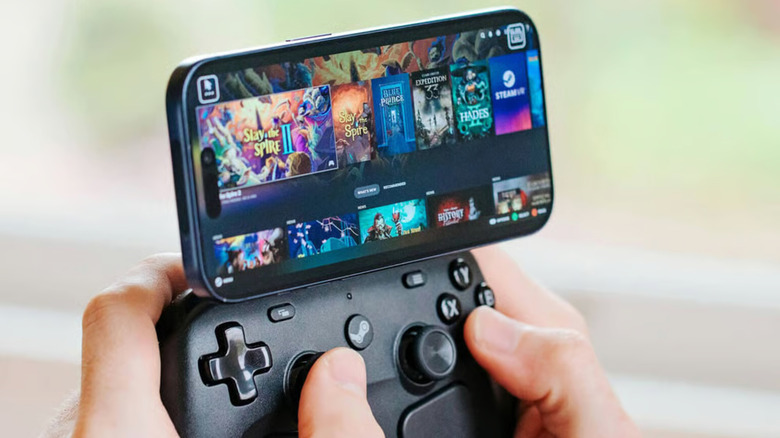
Despite the mechanical feasibility of mounting smartphones to Steam Controller devices, the real challenge lies in software integration and app compatibility. The majority of iOS and Android applications were developed with touchscreen interaction as the primary input method, meaning they lack native support for physical game controller inputs. When attempting to use a Steam Controller with these apps, users will likely encounter unresponsive buttons, unmapped controls, or the controller being completely ignored by the application.
Apple's iOS ecosystem presents particularly strict limitations in this regard. While iOS supports game controller compatibility for certain titles, the vast majority of mainstream apps don't implement controller support in their code. Developers would need to intentionally code MFi controller support into their applications, which requires additional development time and resources that many choose not to invest. This creates a fundamental gap between the hardware capability of mounting and the software readiness of mobile applications.
Android offers somewhat better prospects for game controller compatibility due to the platform's more open nature and native support for various input methods. However, adoption among app developers remains inconsistent at best. While some modern games and certain productivity apps recognize external controllers, the fragmented nature of Android development means there's no guarantee that any given application will support gamepad input. Users shopping for games specifically to use with a mounted smartphone and Steam Controller will find their selection considerably limited compared to console or PC gaming libraries.
The technical connection between a Steam Controller and a smartphone represents another layer of complexity. The wireless functionality of the Steam Controller relies on proprietary Valve protocols when used with Steam on PC, but establishing a connection directly to a smartphone involves different technical considerations. Users would need to rely on Bluetooth connectivity, and the pairing process may not be as seamless or reliable as connecting to a dedicated gaming platform. Battery life on both the controller and the phone could also become a concern during extended gaming sessions.
For users willing to explore this mounting and control combination, the best gaming experiences will likely come from titles specifically designed with external controller support in mind. Indie games on both iOS and Android frequently feature more robust gamepad support than mainstream applications, recognizing that their target audience includes players who prefer dedicated controls. Strategy games, turn-based RPGs, and emulator applications also tend to have better controller support implemented from the ground up.
The emergence of smartphone mounting solutions for gaming controllers reflects a broader trend in mobile gaming evolution. As smartphones become increasingly powerful and capable of running complex games, the desire for console-like control schemes grows stronger among dedicated gamers. The gap between what's technically possible—mounting a phone to a controller—and what's practically useful remains substantial, but innovative solutions continue to emerge.
Looking ahead, the success of phone-mounted gaming controller setups depends largely on increased adoption of gamepad support among app developers. If iOS and Android creators begin prioritizing external controller compatibility as a standard feature rather than an afterthought, the appeal of such mounting solutions would increase dramatically. This would require a cultural shift in mobile game development, where controllers are considered as important as touchscreen input.
Manufacturers have taken notice of these trends, and we may see more purpose-built solutions designed specifically for combining smartphones with dedicated gaming hardware. Some companies are already developing specialized mounts and even mobile-optimized controllers, suggesting that the concept has genuine appeal within the gaming community. These developments could eventually make the phone-mounted gaming experience more practical and widespread than it currently is.
For current enthusiasts interested in trying this setup, the key is tempering expectations around app compatibility. The physical mounting solution works, and the wireless connection can be established, but discovering games and apps that fully support external controller input requires research and patience. Despite these limitations, the ability to transform a Steam Controller into a mobile gaming platform demonstrates the adaptability of gaming peripherals and the creative ways communities extend product functionality beyond original design intentions.
Source: Engadget


